I have noticed in the past couple of Bingo challenges that my active minutes from non-walking activities are not pushed from the Garmin app. As an example, I biked this morning for an hour, but my active minutes total in Bingo did not include this activity. For the fitbit Bingo app, I remember that any form of activity counted. Did you restrict it to walking only?
StepSmash isn’t limited to walking, but Garmin’s Intensity Minutes don’t currently work for us because Garmin doesn’t provide that data in a timeline-based format. Since StepSmash games start at the same time for everyone, we need activity data that’s timezone-agnostic and tied to specific points in time.
I checked your account data, and aside from an elevated heart rate, Garmin doesn’t give us a clear signal that a biking activity was occurring during that period.
The good news is we have upcoming work planned to use heart rate data directly to calculate a metric similar to Fitbit’s Active Zone Minutes for integrations where active time isn’t available. I don’t have an exact timeline yet, but it should be coming soon as it’s a requirement for a new game mode we’re building, and for some marketing activities we’re working on.
I wanted to let you know that the work necessary to support heart rate “Active Minutes” on Garmin has started. I don’t know yet when it will ship, as it’s part of a bigger feature lift across a new fitness integration and existing integrations, but we’re aiming to get it out quickly.
We’ve reworked the way we calculate Active Minutes for Garmin devices in our latest StepSmash release StepSmash Release 1.7.0!
To take advantage of the new method you’ll need to be running StepSmash 1.7.0 or later and you’ll need to set your current age and birth month in your user profile settings. From there StepSmash will compute your heart rate zones and assign active minutes based on them. We put together a detailed guide on how this works How Active Minutes Work in StepSmash.
Going forward I would expect that you see Active Minutes accrue in StepSmash after biking, or any other cardio activity where the tracker isn’t registering much movement even though your heart rate is elevated.
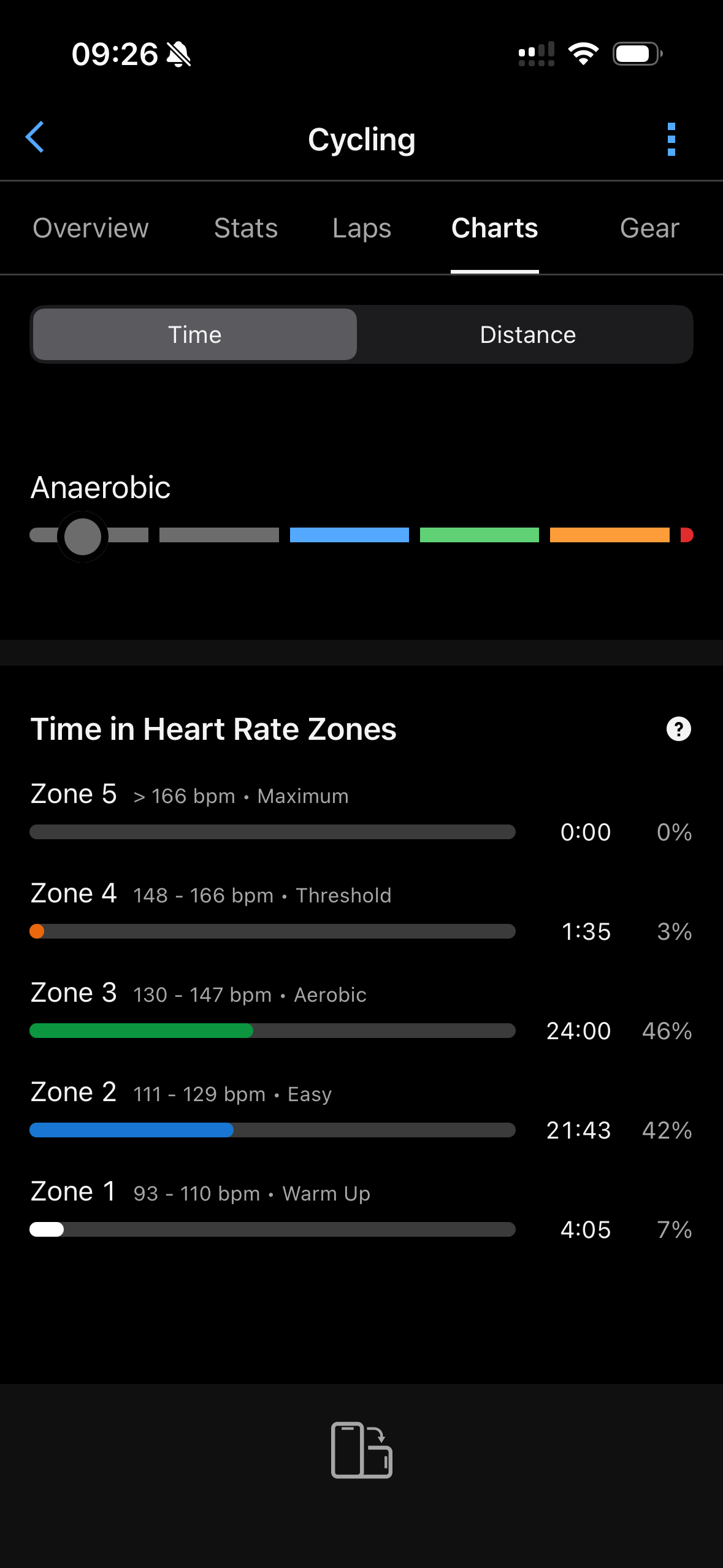
I biked to work this morning. As per my Garmin app, I spent 24 minutes in zone 3 (130-147 bpm), 21 minutes in zone 2 (111-129 bmp) and 1.5 minutes in zone 4 (148-168 bmp). This should have given me atleast 24 activity minutes in Bingo, if not more. However I didn’t get any for this activity.
Can you please take a look? Does it take a while for the Bingo card to update?
I had my watch set on Bike when I did the activity - not sure if this makes a difference.
I biked home after work, I didn‘t start an activity on my watch but it should have been a similar effort. Started around 16:40 CET. Also didn’t get any active minutes on Bingo.
Thanks! That was really helpful and let me narrow down where to look.
I found an off-by-one bug in how we were handling Garmin heart rate data for “today” syncs, and I’ve deployed a fix. I had Garmin re-send your data, and I can now see Active Minutes accruing during your bike rides in a way that matches your heart rate.
We currently model 3 heart rate zones (Fitbit/Google published their zone/minutes approach; Garmin hasn’t), and for that morning ride we’re seeing ~46 minutes total: 26 moderate, 20 vigorous, 0 peak. Since StepSmash awards 2 minutes for vigorous (and peak), that ride comes out to 66 Active Minutes in StepSmash.
I would generally expect that you should see these values show up in StepSmash shortly after your watch syncs to Garmin Connect. Garmin doesn’t provide a strict delivery guarantee for when their servers will notify ours, but in practice it’s usually close to real time.